
Garment Factory Management Software: What to Look For in 2026 (and What to Ignore)
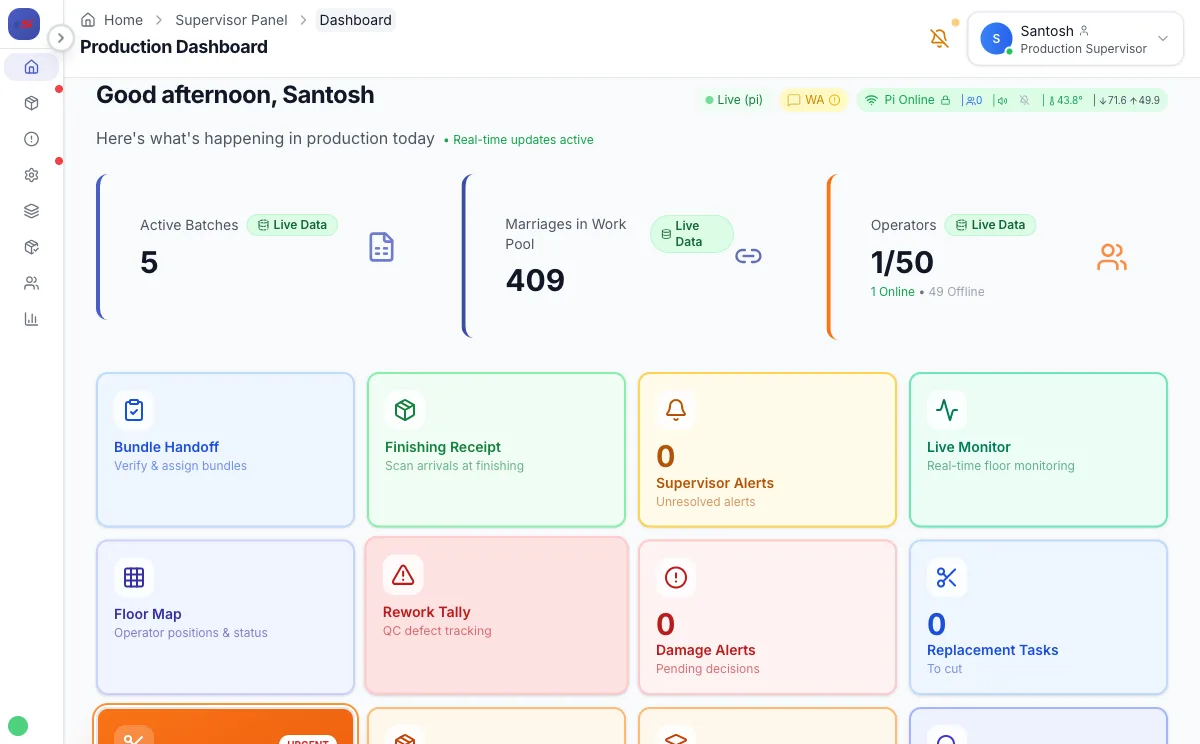
I run a sewing factory in Nepal. We process around 100,000 pieces a month across multiple lines, with 60+ operators working on piece-rate. A few years ago, I was the target customer for every garment factory management software vendor out there — and I bought into two of them before building my own.
Here is what I learned: most garment factory management software is designed by people who have toured factories, not worked in them. The demo looks impressive. The feature list runs to three pages. And then you try to use it on day one, with real operators who have never touched a tablet, on a floor that is loud and dusty and moving fast — and the whole thing falls apart.
This guide is for factory owners and production managers who are evaluating garment ERP software seriously. I will tell you what actually matters, what sounds good but does not, and what questions to ask before you sign anything. For a deeper structural breakdown of what a garments management system covers, including the 7 core modules, see the companion guide.
Why Most "Garment Factory Management Software" Fails on the Floor
The fundamental problem is that most garment manufacturing ERP systems are built around what management wants to see, not around what operators need to do. There is a difference between software that produces reports and software that actually runs production. The global apparel ERP software market is valued at $4.37 billion in 2024 and growing at 7.8% annually — but market growth means more vendors, not better ones.
When I looked at systems like WFX and STITCH MES, the dashboards were polished. The analytics were detailed. But the on-floor workflow — the actual act of an operator scanning a bundle, claiming a work item, and having the system respond in under a second — was clunky or missing entirely. Some systems still require a supervisor to manually enter data that an operator should be recording themselves at the machine.
SAP, at the enterprise end, solves many of these problems in theory. In practice, a mid-size CMT factory with 50–150 operators cannot absorb a SAP implementation. SAP Business One — the entry-level offering — costs $95–$250 per user per month on cloud subscription, or $3,500–$5,500 per user for an on-premise perpetual license plus 18–20% annual maintenance fees. A minimum 5-user deployment runs $20,000–$30,000 per year in licensing alone, before a $25,000–$150,000 implementation engagement on top. The implementation partner fees often exceed the license cost by a factor of three. The system that small and medium garment factories actually need does not exist in the SAP catalogue.
Excel, on the other hand, is where most CMT factories still live. The supervisor keeps a sheet. The cutting room has a different sheet. Payments are calculated at month end by someone who knows the formulas. It works until it doesn't — until a row gets overwritten, a file gets corrupted, or you have three people trying to update the same sheet from different machines.
Garment factory management software that works needs to be designed from the floor up. The operator interface needs to be operable by someone with minimal digital literacy. The system needs to survive a dropped connection. And the supervisor needs to see real numbers, not data that was entered two days ago.
The 7 Features That Actually Matter for CMT Factories
After running production with software — both the ones I bought and the one I built — here are the features that change how a factory operates. These are not nice-to-haves. If a system does not have all of these, it will not hold up under real production pressure.
1. Bundle-Level QR Tracking
Every bundle of cut fabric needs a unique identity that follows it from the cutting table to the dispatch gate. QR codes are cheap to print and fast to scan. The garment production tracking system should record every handoff: who scanned it, at which station, at what time. Without this, you are managing by memory and paper, which means you are not really managing at all.
2. Real-Time Work Assignment
Work assignment is where most garment ERP software breaks down. The system needs to know what work is available, which operators have the right machine type and skill for it, and who has capacity right now. Static daily targets are not enough. You need a live work pool that updates as bundles are completed and new ones become available.
3. Piece-Rate Payment Calculation
If you are running a CMT factory, you are almost certainly paying on piece rate. The payment calculation is not simple — it involves base rates per operation, advances and overtime. The garment ERP software needs to calculate this automatically, operator by operator, and make it auditable. Supervisors and operators both need to trust the numbers.
4. Offline Resilience
Factory WiFi is not office WiFi. Machines move. Walls block signal. Interference is constant. Any garment factory management software that requires a continuous connection will fail multiple times per day. The system needs to queue actions locally and sync when the connection returns — without losing data or creating conflicts.
5. Dependency Tracking Between Operations
In garment manufacturing, operations have sequence dependencies. You cannot attach a collar before the body is assembled. You cannot attach a sleeve before the seam is closed. The garment ERP software needs to know these dependencies and release downstream work automatically when upstream operations complete. Manual unlocking by a supervisor is a bottleneck waiting to happen.
6. Cutting Room Integration
Most garment production tracking software starts at the sewing line and treats cutting as a separate world. It is not. Bundle generation, size ratios, fabric consumption, and lot management all start in the cutting room. The software needs to connect cutting data to sewing work — otherwise you are still maintaining two separate systems.
7. Supervisor Visibility Without Data Entry Burden
Supervisors should be on the floor, not at a desk updating records. The system should build its picture of production from operator actions, not from supervisor data entry. Line efficiency, WIP counts, stuck bundles, and output by operator should all be visible in real time as a byproduct of the work being done — not because someone filed a report.
Features That Sound Good But Add No Value
Vendors will show you many things in a demo that look impressive but do not improve production. Here is what to discount:
AI-Powered Demand Forecasting
CMT factories do not plan their own demand. Your buyer gives you an order. You make it. Demand forecasting tools built for retail brands are irrelevant to CMT operations. If a vendor is highlighting this, they are not selling to factories — they are selling to brands.
Complex HRMS Modules
Attendance, leave management, and basic payroll are useful. But a full human resource management suite with appraisal cycles, org chart tools, and learning management integration adds nothing to garment manufacturing operations and adds a lot of complexity to training and maintenance.
Supplier Portal and Procurement Workflows
Unless you are a vertically integrated manufacturer handling your own fabric and accessory sourcing at scale, a dedicated procurement portal is overhead. Most CMT factories work with a small set of known suppliers on WhatsApp and phone calls. Software does not improve that workflow in practice.
Blockchain Traceability
This is a 2023-era buzzword. A handful of brands are experimenting with blockchain-based supply chain traceability, but no CMT factory in South Asia or Southeast Asia is being asked to integrate with a blockchain layer as a business requirement in 2025. Do not pay for infrastructure that no buyer has requested.
To put the digital maturity picture in context: Industry 4.0 maturity scores across Bangladesh textile and apparel factories average just 1.91 out of 5. 68% claim to have "initiated digital transformation" — but that figure includes factories that installed accounting software or switched from paper registers to Excel. The bar for claiming digital transformation is very low, and vendors exploit that ambiguity constantly.
Built-In Costing Modules With Market Rate APIs
Your costing is done before the order is confirmed. It is a negotiation, not a calculation. Software that pulls market rates for materials and builds automated cost sheets sounds useful but in practice adds no value to how CMT factories actually quote orders.
The True Cost of Garment Factory Management Software Nobody Talks About
The license fee or subscription price is rarely the largest cost in a garment ERP software deployment. Implementation services, hardware requirements, and ongoing training costs routinely exceed the software cost by 2–5x over the first two years. Get written quotes for all of these before you sign.
The failure rate for ERP implementations in discrete manufacturing is 73%, with cost overruns averaging 215% of the original budget across industries. The top three causes — inadequate change management, poor data migration, and inexperienced implementation teams — account for 75% of failures. For garment factories, add a fourth: the system was built for generic manufacturing and could not handle style-color-size matrix operations at the floor level.
When vendors quote you a monthly or annual subscription price, they are quoting you one line item in a much longer bill. Here is what the full cost of ownership actually looks like for garment factory management software:
Implementation and Setup
Most enterprise-adjacent systems require a paid implementation engagement. This means someone from the vendor — or more often a third-party partner — comes to configure the system for your factory. For a factory with 50–100 operators, implementation fees can run from $5,000 to $30,000 depending on the vendor. Some systems charge this as a one-time fee; others structure it as a retainer during the go-live phase.
Hardware Requirements
Some garment ERP vendors require proprietary hardware: specific Android terminals, dedicated barcode scanners, or industrial-grade tablets. These requirements are rarely disclosed upfront and can add $200–$800 per scanning station. A factory with 10 scanning points is looking at $2,000–$8,000 in hardware before the first operator logs in. Scan ERP, by contrast, runs on any Android phone, which most operators already carry.
Training Costs
Training is the most underestimated cost in any software rollout. Not just initial training — ongoing training as operators join or leave, as supervisors change, as new operations are added. If the vendor charges for training sessions, this compounds over time. Systems that are genuinely simple to use reduce this cost significantly; systems that require multi-day training programs for supervisors create a permanent dependency on the vendor.
Customization Lock-In
Many garment manufacturing ERP systems offer customization — at a price. They will add your specific operation types, your payment formula quirks, your label format. But those customizations belong to the vendor, not to you. When you need a change two years later, you pay again. This is how vendors build revenue from customers who have already gone live and cannot easily switch.
Feature Comparison: Must-Have vs Nice-to-Have vs Ignore
| Feature | Must-Have | Nice-to-Have | Ignore |
|---|---|---|---|
| Bundle QR tracking | ✓ | ||
| Real-time work pool assignment | ✓ | ||
| Piece-rate payment calculation | ✓ | ||
| Offline / low-connectivity operation | ✓ | ||
| Operation dependency unlock | ✓ | ||
| Cutting room to sewing integration | ✓ | ||
| Attendance integration (biometric) | ✓ | ||
| WhatsApp / SMS notifications | ✓ | ||
| Fabric and accessory inventory | ✓ | ||
| Label and packing slip printing | ✓ | ||
| AI demand forecasting | ✓ | ||
| Blockchain traceability | ✓ | ||
| Supplier procurement portal | ✓ | ||
| Full HRMS with appraisal cycles | ✓ |
What to Ask Every Vendor in the First Demo Call
Most vendors control the demo. They show you dashboards and smooth workflows in a clean demo environment. Here are the questions that break that script and reveal how the system actually behaves:
"Show me what an operator sees when they scan a bundle."
Not a manager, not an admin — the person who stands at a sewing machine all day. If the operator-facing interface requires multiple taps, a menu navigation, or a login with a password that gets forgotten, you have a problem. The scan-to-confirm flow should be under three seconds for an experienced operator. If the vendor cannot show you this live, ask why.
"What happens when the WiFi drops?"
Watch the vendor's face. If they say "our system requires a stable internet connection," you know what kind of floor they have never stood on. Good garment factory management software should queue operations locally and sync when the connection returns. Ask specifically: do scans get lost, or are they preserved? What does the operator see during the outage?
"How long does it take to set up a new article and its operations?"
In a real factory, you get a new order every few weeks. The article is new, the operation sequence is different, the machines are different. The time from "new order received" to "first bundles can be scanned on the floor" should be measured in hours, not days. Ask the vendor to set up a sample article during the call. You will learn more from watching that process than from any slide deck.
"What does implementation actually cost, and who does it?"
If the answer involves a partner ecosystem, third-party consultants, or a multi-week scoping engagement, that is your cost signal. A system that requires an external consultant to configure is a system that was not designed for factory owners to run themselves.
"Can I see a factory your size that went live in the last six months?"
Reference customers are standard. But ask for a recent one, at your scale. Vendors will show you their most successful deployment — which is often their largest customer with a dedicated IT team. Ask for a comparable operation. If they cannot produce a reference, that is information.
"What is the per-operator cost at 60 operators vs 120 operators?"
Many garment ERP software pricing models include per-user tiers that create significant cost cliffs as you grow. Understand what growth costs before you are locked in.
How Small Factories Go Live Without a 6-Month Project
If a vendor cannot get a factory under 100 operators live within two weeks of you providing your operation list, machine count, and operator roster — walk away. A garment factory management software deployment should not be a project. It should be a setup. The complexity is in the product, not in the implementation. Any system that requires six weeks of configuration before your first scan is not built for factories — it is built for consultants.
I have seen garment factories spend four months in "implementation" before going live on software that then failed on day two because the offline fallback was not tested. The implementation period is where vendors hide product weakness. If the software is genuinely designed for the floor, setup is fast.
Here is what a real two-week go-live looks like with garment factory management software that is built correctly:
Week One: Configuration
Days 1–2: Enter your machine types and assign machines to operators. Enter your article list and operation sequences. Confirm the payment rate per operation per machine type.
Days 3–4: Set up one cutting batch as a test. Generate QR codes for 20–30 bundles. Walk one supervisor through the interface. Print test labels.
Day 5: Run a shadow day. The old tracking method continues, but one production line also scans through the new system. Compare outputs at end of day.
Week Two: Full Floor
Days 6–8: All operators on the floor scan their work through the system. Supervisors use the live dashboard instead of walking to check progress. Identify any missing operations or rate corrections.
Days 9–10: Cutting room team starts entering lot data directly into the system. First automated payment report generated. Compare against manual calculation. Fix any discrepancies.
By day 14, the system is running production, not running alongside it. That is what a real implementation looks like.
Scan ERP was built under this constraint. We went live in our own factory first, under real production conditions, before we offered it to anyone else. The first thing we discovered was that the operator interface had to be simpler than we thought — and the second thing we discovered was that the QR scanner needed to work in poor lighting at arm's length, because that is how it gets used on a sewing floor. Those are the kinds of discoveries you only make when you are building CMT factory software for real CMT factories.
If you are comparing against WFX or a STITCH MES deployment, ask yourself: who is that system built for? WFX is designed for brands managing multiple suppliers, not for the CMT factory that is one of those suppliers. STITCH MES has good shop-floor tracking but its pricing and implementation model assumes a factory with an IT department. Excel is still the honest answer for a factory that is not ready to commit to a system — but at 50+ operators, Excel starts to crack, and it cracks fast.
The right garment factory management software for a CMT factory in 2025 is one that an operator can learn in 20 minutes, a supervisor can configure without calling support, and a factory owner can see on their phone during a buyer visit. That combination is rarer than the vendor landscape makes it look.
A Forrester study found 106% ROI over 3 years with a 17-month payback period for manufacturing ERP. But those numbers assume correct vendor selection and a successful implementation — the 73% that fail never see that ROI. The question is not whether ERP pays off. It is whether you end up in the 27% that actually goes live and stays live.
What does Scan ERP cost?
Scan ERP costs $4 per machine per month, or $0.005 per finished piece tracked, whichever bills lower that month. A 50-machine CMT factory pays about $200 a month. There is no minimum, no per-user fee and no contract. Hardware is $1,500 to $3,000 one-time and bought separately.
See Scan ERP on Your Factory's Real Data
20-minute demo call. We use your actual lot numbers, machine count, and production flow — not a generic walkthrough.
Book a Free Demo →